Loading TDR Gear...
Desktop PC in Bangladesh Desktop PCs remain a versatile choice for gaming, office work, content creation, programming, education, business applications, and …
Desktop PCs remain a versatile choice for gaming, office work, content creation, programming, education, business applications, and demanding professional workloads. Unlike laptops, desktop computers offer greater flexibility in component selection, cooling, expansion, and future upgrades.
At TDR Gadgets, you can explore different types of desktop computers, including custom-built PCs, gaming PCs, brand desktops, All-in-One PCs, Mini PCs, and professional systems. Whether you need a basic computer for everyday tasks or a powerful workstation for demanding workloads, choosing the right configuration starts with understanding your requirements and budget.
The price of a desktop PC in Bangladesh depends heavily on its processor, RAM, storage, graphics solution, motherboard, power supply, case, cooling system, and other components.
A basic desktop can be configured for everyday office and home use, while higher-performance systems can be built for gaming, video editing, 3D rendering, software development, AI workloads, and other demanding applications.
For the latest desktop PC price in Bangladesh, check individual TDR Gadgets product listings for current pricing, availability, specifications, and applicable warranty information.
Desktop computers are available in several form factors and configurations. The right option depends on your available space, performance requirements, upgrade plans, and intended use.
A brand desktop PC is a pre-built computer manufactured and configured by a specific brand. It is a convenient option for users who prefer a ready-to-use system without selecting and assembling individual components.
Brand PCs are commonly used in offices, businesses, educational institutions, and home environments. Their compact designs and standardized configurations can make deployment easier.
However, upgradeability varies by model. Before purchasing, check which components can be upgraded or replaced.
An All-in-One (AIO) PC integrates the computer hardware into the display chassis. This eliminates the need for a separate traditional desktop tower and can create a cleaner, more space-efficient workspace.
AIO computers are particularly suitable for:
Because most components are integrated into the display assembly, upgrade options can be more limited than those of conventional desktop PCs.
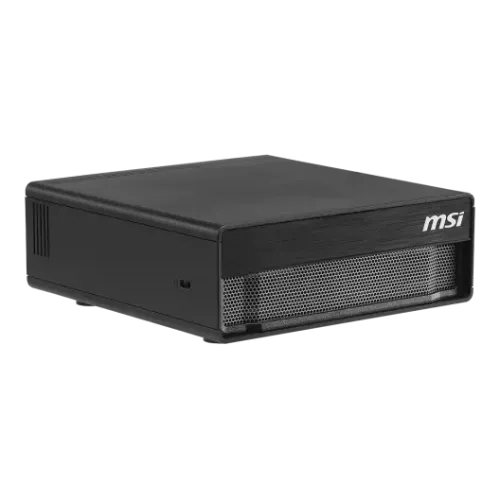
Mini PCs provide desktop computing performance in a compact chassis. They are useful when desk space is limited or when a system needs to be easy to relocate.
Depending on the configuration, a Mini PC can handle office applications, browsing, media consumption, programming, and even selected creative or gaming workloads.
Before purchasing, check its processor, RAM configuration, storage options, cooling system, and available ports.
A custom PC allows you to select individual components according to your requirements and budget.
A typical custom desktop configuration may include:
Custom-built PCs offer greater control over performance, component quality, appearance, and future upgradeability.
Gaming PCs are designed around graphics and processing performance. Depending on the games and target resolution, a gaming desktop may include a powerful CPU, dedicated graphics card, high-speed RAM, fast SSD storage, and enhanced cooling.
A gaming PC can also be suitable for workloads such as:
Business desktops are designed primarily for productivity, reliability, and efficient day-to-day operation.
They are suitable for applications such as:
For business deployments, factors such as power efficiency, security features, warranty coverage, connectivity, and serviceability can be more important than raw performance.
Home desktop computers can be configured for everyday computing, media consumption, family use, light gaming, education, and general productivity.
Depending on the intended workload, users can choose between compact systems, conventional desktops, AIO PCs, or more powerful custom configurations.
Selecting the right desktop requires more than comparing the processor or price. Consider the complete configuration and how it matches your workload.
The processor is one of the primary components affecting overall desktop performance. Modern desktop systems are available with processors from platforms such as Intel and AMD, with different core counts, clock speeds, architectures, and power requirements.
Choose the processor according to your workload rather than simply selecting the highest specification available.
RAM affects multitasking and the ability to run demanding applications smoothly.
For a new desktop, consider the amount of RAM required by your applications and whether the motherboard provides additional slots for future upgrades.
Also consider the RAM generation, speed, capacity, and compatibility with the motherboard.
Desktop PCs commonly use SSD and HDD storage.
An SSD provides substantially faster system boot, application loading, and file-access performance than a traditional mechanical HDD. NVMe M.2 SSDs can provide particularly high storage performance on compatible systems.
A common configuration is to use an SSD for the operating system and applications while using a larger HDD or SSD for additional storage when required.
A desktop can use integrated graphics or a dedicated graphics card.
Integrated graphics can be sufficient for office work, web browsing, media playback, and many everyday applications. A dedicated GPU is more appropriate for demanding gaming, video editing, 3D applications, rendering, AI workloads, and other graphics-intensive tasks.
When selecting a graphics card, consider the applications you use, target resolution, refresh rate, VRAM requirements, power consumption, and available space inside the case.
The Power Supply Unit (PSU) is a critical component of a desktop PC.
A properly selected PSU should provide sufficient wattage and appropriate connectors for the complete system, including the CPU and graphics card.
When building a custom PC, consider PSU efficiency certification, protection features, manufacturer reputation, capacity, and upgrade requirements rather than selecting a power supply based only on wattage.
The motherboard determines processor compatibility, RAM support, storage interfaces, connectivity, and many upgrade possibilities.
Before purchasing a desktop or building a custom PC, check for:
Adequate cooling helps maintain stable performance and system reliability.
Depending on the processor and workload, a desktop may use a stock, tower-style, or liquid CPU cooler along with case fans.
High-performance gaming and workstation systems require particular attention to airflow, CPU cooling, GPU temperatures, and overall case ventilation.
A desktop setup may require a separate monitor, so choose the display according to your workload.
Important specifications include:
For general productivity, Full HD or higher resolution can be suitable depending on screen size. Gamers and creative professionals may require higher refresh rates or more color-accurate displays.
Define what you will use the PC for before setting a budget.
A system intended for web browsing and office applications does not require the same configuration as a gaming PC, video-editing workstation, software-development system, or professional rendering machine.
One of the major advantages of a desktop PC is its potential for future upgrades.
If you plan to upgrade later, check the availability of additional:
A slightly more expandable configuration can provide greater flexibility over the system's lifespan.
Choose a form factor according to your available space and performance requirements.
The operating system should match your applications and workflow.
Windows is widely used for gaming, productivity, business applications, and general computing. Apple desktop systems use macOS and are designed around Apple's hardware ecosystem.
Instead of choosing a desktop purely by price, consider what performance you need from the system.
Budget desktops are designed for everyday tasks such as:
The exact configuration and price depend on the selected processor, RAM, storage, and other components.
Mid-range systems provide additional performance for users who need more than basic productivity.
Depending on the configuration, they can be suitable for:
High-end desktops use more powerful components for demanding workloads.
These systems can include high-performance CPUs, dedicated graphics cards, large amounts of RAM, high-speed NVMe storage, advanced cooling, and higher-capacity power supplies.
They are suitable for demanding gaming, professional content creation, 3D rendering, animation, simulation, development, and other compute-intensive workloads.
The ideal desktop configuration depends on the software and applications you use.
For office work, prioritize reliable performance, sufficient RAM, SSD storage, and connectivity.
For programming and development, consider CPU performance, RAM capacity, fast SSD storage, and the ability to connect multiple displays.
For gaming, prioritize the GPU, CPU, RAM, storage, cooling, and monitor combination.
For video editing, 3D rendering, and professional workloads, consider higher-core-count processors, dedicated graphics, larger RAM capacity, fast storage, and appropriate cooling.
TDR Gadgets offers desktop computers and components for different budgets and workloads, including brand PCs, Mini PCs, All-in-One PCs, custom desktops, gaming PCs, and performance-oriented systems.
Before purchasing, compare the complete configuration rather than focusing on a single component. Consider the CPU, GPU, RAM, storage, motherboard, PSU, cooling, case, display requirements, and future upgrade options.
Browse the available desktop PCs at TDR Gadgets and check each product listing for the latest price, availability, specifications, and applicable warranty information.
Gaming desktops are generally configured with stronger graphics and processing hardware to handle graphically demanding games. They may also include improved cooling, faster memory, high-performance storage, and gaming-oriented cases or components.
Both Intel and AMD offer a wide range of desktop processors. The better choice depends on the specific processor, workload, platform features, budget, and compatibility with the rest of the system.
Yes. Many conventional desktop PCs support upgrades to components such as RAM, storage, graphics cards, cooling systems, and sometimes the processor. However, upgrade compatibility depends on the motherboard, case, PSU, and existing hardware.
For general freelancing and remote work, prioritize a capable modern processor, adequate RAM, SSD storage, reliable connectivity, and a comfortable monitor. The required configuration will increase if your work involves video editing, 3D design, programming, or other demanding applications.
There is no single suitable price range because desktop PCs vary significantly by configuration and intended use. Budget systems can handle basic tasks, while mid-range and high-end configurations provide progressively greater performance for gaming and professional workloads.
Check current TDR Gadgets listings to compare available configurations and prices.
You can explore desktop PCs and related components through TDR Gadgets. Compare configurations and product specifications before choosing a system that matches your workload and budget.